Tuesday, January 20, 2009

Schmap Chicago Guide shortlisted my photo

Okay, I am very excited about this one. Schmap magazine has shortlisted one of my photos on chicago for its 6th edition. Though this is not the best photograph i have ever taken, and i am not gaining anything financially, a pat on the back always feels good; especially when its a magazine.

They picked this picture from my Flickr stream

Here is the picture they picked and mail from their editor.


From: Emma Williams
Date: Tue, Jan 20, 2009 at 9:27 AM
Subject: [Flickr] Schmap: Chicago Photo Short-list
To: prasanth.james@gmail.com


You've been sent a Flickr Mail from Emma J. Williams:

------------------------------------------------------------

:: Schmap: Chicago Photo Short-list


Hi Prasanth,

I am writing to let you know that one of your photos has
been short-listed for inclusion in the sixth edition of our
Schmap Chicago Guide, to be published mid-February 2009.

http://www.schmap.com/shortlist/p=97292732N00/c=SJ20152865

Clicking this link will take you to a page where you can:
i) See which of your photos has been short-listed.
ii) Submit or withdraw your photo from our final selection
phase.
iii) Learn how we credit photos in our Schmap Guides.
iv) Browse online or download the fifth edition of our
Schmap Chicago Guide.

While we offer no payment for publication, many
photographers are pleased to submit their photos, as Schmap
Guides give their work recognition and wide exposure, and
are free of charge to readers. Photos are published at a
maximum width of 150 pixels, are clearly attributed, and
link to high-resolution originals at Flickr.

Our submission deadline is Tuesday, January 27. If you
happen to be reading this message after this date, please
still click on the link above (our Schmap Guides are
updated frequently - photos submitted after this deadline
will be considered for later releases).

Best regards,

Emma Williams,
Managing Editor, Schmap Guides
www.schmap.me/emma.williams

Sunday, January 18, 2009

Best $100 speakers

I need a good pair of speakers for my limited $100 budget. My expectation from them would be,

1. Medium to good quality high range frequency production
2. Good quality mid range frequency (vocal quality if very important to me - for music and movies)
3. Low to medium quality low range frequency (Obviously i can't expect more than that from a $100 speaker)
4. Good stereo imaging
5. Compact size
6. Aux input for my old iRiver H120
7. Should be able to connect to my TV if need be.
8. Headphone jack


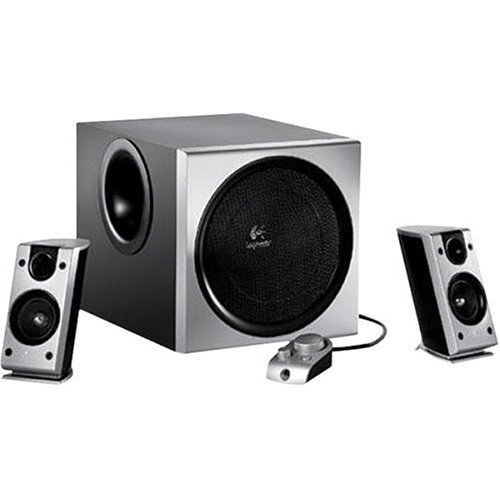
After hours of research, i have closed on Logitech Z2300, M-Audio Studiophile 30 and Bose companion 2. Though i don't think Z2300 will make the cut with its competitors, i am going to decide that only after listening to one of them at a store. If one prefers bass over vocal performance, Z2300 is the choice. I am not much after rap, R&B or house as my Last.fm library would tell you and so, the 2.1 Z2300 need not be the one for me.

Z2300 is $85 and the others sell at $99/pair on Amazon and BestBuy and hence technically in my budget. All of them seem to have the audio reproduction characteristics that i am looking at and i am already a little biased towards M-Audio from what i have discovered about them so far.


M-Audio Studiophile 30


Best in the category for its low to mid range reproduction. Most people who bought this felt that this pair produces the complete spectrum accurately.


Logitech Z2300


8" woofer for the beats


Bose Companion2


Famous for its stereo imagining capability


In part 2 of this blog, i'll update my in store experience with these speakers and my decision.

Sunday, January 11, 2009

Cisco VPN client setup on Sabayon linux 3.5

I have a Cisco VPN at work and CIsco provided VPN client won't install on my 64 bit windows Vista. Hence, i set it up on my Sabayon 3.5 mini linux box using 'vpnc' and 'rdesktop'. This is how you do it.

Install vpnc. 'vpnc' is the application that sets up a network connection with the VPN server by adding a rounter configuration.

Find the latest version of vpnc available to you by running


equo search vpnc


Install it


equo install net-misc/vpnc-0.5.2_pre20080509-r1


Next step is to create a vpnc configuration. If you have a 'pcf' file, you can do this by running the 'pcf2vpnc' utility. PCF is the CISCO client configuration file. Ask your network admin to procide you one. I am writing the configuration to vpnc's default configuration file so that i don't have to specify a configuration file when starting vpnc.


pcf2vpnc <pcf file> /etc/vpnc/default.config


Double check the configuration is intact. Also, if you are manually setting up configuration and not creating it from a pcf file, this is where you do it.


nano /etc/vpnc/default.config


## generated by pcf2vpnc
IPSec ID <connection_name>
IPSec gateway <vpn_ip>
IPSec secret <vpn_pwd>

Xauth username <domain name\username of the network you are connecting to> # domain\userId
Xauth password <domain password> #pwd
IKE Authmode <authmode> # Leave this to default


Start vpnc.


localhost pjames # vpnc
VPNC started in background (pid: 8138)...


If you get this message, we are good. vpnc deamon has started successfully.

Verify the connectivity. Check 'netstat -r' and make sure you see the new network connection to VPN server. Then, ping a machine in your VPN network.

So far, we have established a connection to the VPN. However, for a connection to the terminal desktop, you need a GUI tool - 'rdesktop'.

Install rdesktop.


equo install rdesktop


Now run rdesktop from console.


rdesktop -d <domain> -u <user> -p <pwd> <machine name>


You should get the target machine's desktop now. Disconnect from the machine and run rdesktop with '-f' flag for full screen.


rdesktop -f -d <domain> -u <user> -p <pwd> <machine name>


Now, let us add 'vpnc' as a start up service so that you don't have to do it manually every time.

rc-update add vpnc default


Last thing you may want to do is to create launcher for 'rdesktop' and place it as a short cut.

Thats it. I am one click away from my office machine now.


Update: The default conf file name for vpnc should be vpnc.conf (not default.conf) for the deamon to load it while start up.

Sunday, January 4, 2009

Selenium Vs Watir

Selenium and Watir the best front end based web application testing frameworks at present. Even though there are other frameworks out there, like webtest, they cannot scale up to the web 2.0 style client heavy web applications. They are not good with XHRs are Javascripts. Both selenium and watir supports test suites in Java or Ruby and you can replay them subsequently.

Selenium has a firefox based recorder tool also, that can capture browser actions and create test cases in multiple languages like Java and Ruby.

Best way to start on Selenium is by watching the tutorial they have on their website. Setup and running it is as easy as they tell us in this tutorial.

The IDE can show you Java/Ruby code for the recorded test case. Copy that and run as java test case with selenium apis in classpath.

This is for simple scenario testing. For a larger, concurrent load testing, use Selenuim RC framework. This is capable of running tests in parallel threads.

Even though Selenium is cool, my personal favorite is Watir. There is only one factor that makes Watir the winner, according to me that is, and that factor makes all the difference. It is the philosophy with which these tools have been made. Watir is a tool that is made by testers and for testers, by focusing on what really should be the focus point for the person who uses it.

A simple scenario discussion will prove this. In Selenium, after a request submit is done by the script, it doesn't know how to detect the arrival of response. So, technically it waits for a specified amount of time and then assumes the page has been loaded with response content. In test suites, it comes as a line like this one-selenium.waitForPageToLoad("30000");Defining this wait period becomes the script writer's (tester) responsibility. Should they be?

If you have a process to run test cases on multiple environment's, it can worsen the scenario so quickly.

Also, your load testing results are not accurate when you have ambiguous wait periods defined all over request submissions.

In my experience, i have seen the recorded tests not functioning properly because the way page elements are automatically detected may not be the way you want it to be. You will understand this if you write a test case to login to your gmail account and read a mail or study the recorded test case source in detail.

Watir, on the other hand works embedded within the browser in a way. This means, it can detect when the server response comes back. Tester can focus on what the response value should be rather figuring out what the approximate wait period on each page should be. Watir is also tested to be better for Ajax based testing.

Watir has the full API set support from Ruby, which makes it much more powerful than Selenium. For load generation and parallel threads, one needs to write Ruby scripts for test cases. All that is covered in their test case.

On the cons side, Watir doesn't have a matured recorder tool. Watir is a Ruby framework and knowledge of Ruby is mandatory. But hey, if you are of the learner type Ruby is a cool place to hang around. So, if you are in the mood, jump on to Watir::IE.new.goto "Watir website"


Trivia: Ruby is really good when it comes to utility frameworks like Watir, BuildR, some report generation with the good regex support or quick prototyping. You can always build small applications with Ruby and Rails. But will it ever be on par with an enterprise platform like Java? Not at the moment, i guess. Had that been the case, we would never have had to come up with J2EE; programmers would have been happily coding in C and Perl. Ruby guys need to talk more about scalability, transaction managements and other enterprise application attributes if they want Ruby to be anything more than what it is currently.

Saturday, January 3, 2009

TV++, watch it anywhere

Continuing from my previous blog, this is the last blog of this series that will talk about options that will get your favorite programs and media files for view anywhere. You don't really need that TV set in your home to watch the last episode of "The Family Guy". You can watch it over the internet from anywhere - your office (you don't really wanna do that), coffee shop, airport lounges, etc., etc., any place with a wi-fi. All you need is to add this one more box to your home theater setup, called 'SlingBox'.

SlingBox can connect to a DVR or TiVo and broadcast your signals across the internet so that you can watch them on a laptop from any place. They also have a product called Sling Catcher which can grab signals from a SlingBox within the limited radius and let you watch TV on another television or laptop within the house.

On their website, they have shown the various uses of a SlingBox. watch it here.

So, If you recognize yourself as someone who is addicted to television, spends a lot of time in front of it; and often misses other things in life, this is the setup for you- LCD/Plasma TV, TiVo and a SlingBox. And maybe a good BlueRay player for those rentals.

What can be the next development in television broadcast? I am guessing it going to become even more mobile. Like, for eg., you can connect to your channels using a mobile phone. You need a media streaming client in your mobile phone that can connect to your home DVR/TiVo and get your personal media; or watch your channels on a mini TV in your car. Wait and watch!!

Thursday, January 1, 2009

GA, are they watching us?


You : GA**, are they watching us?
GA : Lemme check the radar
You : What does it say?
GA : As a matter of fact, they are..including three new from Russia, you have been in their views for the last 3 days, 200 of them, to be precise.
You : Emmm...do i have reasons to panic?
GA : I am sorry, i can't tell you that. I am only a website analytic robot.

{John Williams play 'Prologue' in the background}

=== End of chapter 3: the unknown element===
=== Curtains ===


GA**: Google Analytics is a website traffic analizer from google. It can tell you quite an interesting number of facts about your website, like

  • how many visitors have been on your site
  • how many of them are new visitors
  • which page attracts more users
  • what parts of the world your users are from
  • how much time do they spend on your site
  • traffic source to your site


You also have the option to set goals for your site and map it against the actual.

What you need first is a google user account and profile. Then go to google analytics and access analytics. Register your website address in your analytics profile. You are almost done.

Google needs to put a small javascript snippet in your website to send traffic information to analytics engine. This javascript code, which google will provide you once you register your website, needs to go between the <head> and </head> tags of your website HTML.

PS: If you want to track traffic on your blog site; you can do that buy going to your blogger account->Layout->Edit HTML. make sure to put this script in <head> section itself, though google will ask you to put it in <body> tag. <head> is the right place for javascript and everything will work properly. It only makes a difference if you have Ajax style body rendering without loading the entire page. Since that is not the case with blogger, we are good.

You are all set. Give google 24 hours to collect the initial stats from your site and be surprised to see who your users are.

For more details, go to analytics help


=== Curtains up ===
{John Williams play 'Duel of the fates'}
=== Chapter 4 : duel of the fates===