Showing posts with label Technology. Show all posts

Wednesday, April 2, 2014

Creating Weblogic Store and Forward (SAF) for EDN

SAF is a very reliable mechanism when you have to move JMS messages between servers. In one of my recent projects, I had to send ADF business events from a weblogic server to my SOA domain on a different box. Because my EDN  subscriptions are on the SOA server, I had to create a pseudo EDNQueue on ADF weblogic server and move it over to the actual EDNQueue on the SOA server.

Moreover, because it is a pseudo queue on sending server, you could even have the JNDI of the queue different than the actual JNDI of the queue on remote server. This means, in my scenario, I could create a pseudo local JNDI for EDNQueue (JNDI: jms/fabric/EDNQueue); but have it forward to a regular JMS queue with a different JNDI (other than jms/fabric/EDNQueue) on the SOA server. This is a consideration if you want to get away from some of the inherent limitations of EDN subscriptions.

Here is how you do it.

Preparing ADF server for EDN:
This step is specific to ADF applications on non-SOA domains that want to use EDN. For steps to create an ordinary SAF, go to next section.

1. Copy the two directories oracle.soa.fabric_11.1.1 and oracle.soa.workflow_11.1.1 to the non-SOA server. We will be deploying these as shared libraries on the non-SOA servers. Make sure these folders are copied to the same location. These servers bring the EDN capabilities to a regular weblogic. These folders can be found under /oracle_soa_home/soa/modules of a SOA domain.

2. From non-SOA server console, go to deployments and deploy these shared libs by browsing and selecting oracle.soa.workflow_11.1.1/oracle.soa.workflow.wc.jar
3. Complete the steps and make sure the jars are showing up on the console.

Receiving SOA server:
Create the queue on the server to which JMS messages need to be forwarded. In my case, queue is TestEDNQ.

Sending ADF server:
This is where we will be creating the SAF mechanism to forward messages to TestEDQ on the receiving server.

1. Create a SAF agent from weblogic console of the server. Services>Messaging>Store-and-Forward Agents. Create new, give a name, and select an appropriate 'Agent Type'. I am leaving this as 'both'. Pick a value based on the purpose of this agent to either send, receive or both SAF messages.

2. Create a jms server and jms module they doen't exist. Services>Messaging>JMS Servers and Services>Messaging>JMS Modules.
3.  Create a sub deployment for the jms module and specify the target to a JMS server.
4. Create a SAF remote context. This is the connection to the remote receiving server. From within jms module, click new> select 'Remote SAF Context'> Specify a name, t3 URL to the remote server, user name and password. In the screenshot below, I am setting up my remote context to weblogic at localhost:7101

5. Create SAF imported destinations. This is a collection of queues and topics that can share the same SAF remote context. From within jms module, new>select 'SAF Imported Destinations', specify a name, select the remote SAF context that got created in previous step. Leave the default targeting and finish.

6. Created SAF remote context and imported destinations should look like this:


7. Create SAF queue. This is where we specify the remote queue and JNDI. In my case, I am trying to forward an EDNQueue to a regular JMS queue on the remote server. Hence, I have different values for local and remote JNDIs. However, if remote queue's JNDI is what you need on local server also, ignore the local JNDI value in this configuration. Click on the created SAF Imported Destinations > go to queues tab> 'New' and enter remote queue name and remote queue JNDI. Click OK.
8. Once created click on the created queue and add additional configuration. There is where I am overdiding remote JNDI with a different JNDI name locally on this server. My local JNDI is that of the EDNQueue and remote JNDI is that of the queue to which I want to forward my events (JMS messages).

9. Send a test JMS message to jms/fabric/EDNQueue and it will get forwarded to JMS/TESTEDNQ on the remote server. Important note here is that there is no local physical queue on the sender. All you do is, with the SAF configuration, you create a reference to a remote queue and SAF will store the message and forward it to the queue based on its availability.
10. Optionally, error handler can also be configured for SAF destinations.

Wednesday, October 28, 2009

Open source ESBs

ESB Introduction

In computing, an enterprise service bus (ESB) refers to a software architecture construct. This construct is typically implemented by technologies found in a category of middleware infrastructure products, usually based on recognized standards, which provide foundational services for more complex architectures via an event-driven and standards-based messaging engine (the bus).

Enterprise Service Bus is an evolving architecture technique to integrate incompatible business applications over a common messaging bus. The ESB lies between the business applications and enables communication among them. Ideally, the ESB should be able to replace all direct contact with the applications on the bus, so that all communication takes place via the bus. In order to achieve this objective, the bus must encapsulate the functionality offered by its component applications in a meaningful way. This is typically accomplished through the use of an enterprise message model. The message model defines a standard set of messages that the ESB will both transmit and receive. When it receives a message, it routes it to the appropriate application. Often, owing to the fact that the application was not built with the message model in mind, the ESB will have to transform the message into a legacy format that is understandable by the application.


Role of ESB in SOA world

ESB is one architecture style that abides by the rules of a Service Orientated Architecture.


Figure 1 explains the basic architecture of any ESB binding. All ESBs support a set of protocols for endpoint binding. Messages received at an end point undergo transformation using message transformer provided. Message transformation is done to convert the request to a data structure known by the service to be invoked. It can then be passed to the component service like Java POJO itself, EJB, JDBC, etc. Integration with other container frameworks like Spring or PicoContainer also happened at this logical stage. The response from service invocation is then routed an appropriate outbound endpoint. Response message is transformed appropriately to match a format known by the receiver before it is sent to the receiver endpoint.

Main advantages that the ESB architecture inherits to the SOA world are given below.

•Faster and cheaper accommodation of existing systems. Increased flexibility makes it easier to change as requirements change.
•Predefined ready-for-use service types.
•No central rules engine, no central broker.
•Incremental changes can be applied with zero down-time.


There also are a few overheads that need to be considered before one goes the ESB way.

•Requires ongoing management of message versions to ensure the intended benefit of loose coupling. Incorrect, insufficient, or incomplete management of message versions can result in tight coupling instead of the intended loose coupling.
•Extra overhead and increased latency caused by messages traversing the extra ESB layer, especially as compared to point to point communications.
•All benefits and cost advantages of ESB come into play only when you have a SOA based system in consideration.

Component integration standards

There is no de-facto standard for SOA service/ component integration as of today. ESB is only a mechanism to make this integration easier by making communication between components independent of the service.

There are two emerging standards in component integration which look very good in what they promise and there are ESB tools that support either of these standards.

There also are tools that just do what ESBs are supposed to do without going by a particular standard. E.g.: Mule

Reason for mentioning these standards in this document is that one of the criterions in selecting an ESB could be selecting, if need be, the standard itself that one want to pick for component integration.


a.JBI

Java Business Integration (JSR208) is an emerging standard that defines common interfaces for components and message exchanges for application integration. It is a JAVA community process initiative.

JBI is built on a Web Services model, and provides a pluggable architecture for a container that hosts service producer and consumer components. Services connect to the container via binding components (BC) or can be hosted inside the container as part of a service engine (SE). The services model used is Web Services Description Language 2.0.

The central message delivery mechanism, the normalized message router (NMR), delivers normalized messages via Message Exchange Patterns (MEPs).

b.SCA

Service component architecture, as a standard for assembling services together, stands one step ahead of JBI in the fact that it supports multiple technologies and languages whereas JBI is limited to Java components. This means, SCA services can be implemented in languages and technologies more than just Java [For e.g.: An implementation of SCA supports invocation of services implemented in EJBs, Java POJOs, BPEL process, COBOL, C++, PHP, Ruby etc.]. SCA standard is promoted by vendors like IBM, Oracle, TIBCO, BEA and supported by OASIS committee.

Service Component Architecture defines a simple, service-based model for construction, assembly and deployment of network of services (existing and new ones) that is language-neutral. Main artifacts in an SCA style design are

Service Data Object (SDO) provides a uniform interface for handling different forms of data, including XML documents that can exist in a network of services and provides the mechanism for tracking changes.

Data Access Service (DAS) provides a simple SDO interface to relational databases.

Even though SCA looks more promising and futuristic in terms of acting as a framework for SOA, it is too early to write a verdict on the success of this technology as it is in its incubator stages.


The messaging infrastructure would help ease application integration

a.Via loose coupling of components, including legacy assets, communicating over disparate transport protocols
b.With minimal re-programming effort for message transformations

The supporting tools should enable

a.Quick development and configuration of messaging channels though established frameworks and patterns
b.Administration of the messaging infrastructure elements by operational staff

Please note that #1 above implies assurance of inter-operability of components residing on diverse technology stack like .net, j2ee, AS400, mainframes over a messing infrastructure only.

Transaction and security support is also desired from the ESB framework.

ESB Options

Some of the best and popular open source ESBs are

��. Mule
��. Mirth
��. Apache ServiceMix
��. OpenESB
��. FuseESB
��. Apache Tuscany
��. Fabric3


Recommendations

Mule stands as an excellent choice if alignment with a particular component integration standard is not desired. The fact that it supports POJO message objects is very much suited for normal development models.

In the availability or plan to have the availability of standard messaging models with WSDL, a JBI container based routing is the best option to go for. An alternate option to this is to additionally develop marshallers at endpoints so that JBI containers still get to work with normalized XML messaging model.

The decision for JBI over SCA can be well supported by the fact that there already are a number of JBI components that stand good and ready to use for most of the domains. Having said this, the future of SCA in the commercial arena doesn’t look dim at all provided the fact that it is supported by many of the industry giants like BEA, IBM, Oracle, and TIBCO and supported by OASIS.

SCA, as already mentioned in the previous sections is too early for serious adoption unless decided to go for a commercial framework like the one from TIBCO.

This evaluation was only limited to open source candidates in the industry. Provided commercial tools are an option, frameworks like Fiorano or Sonic MQ could prove a better solution to our requirement in terms of performance and support.

Glossary

��. ESB – Enterprise Service Bus
��. JBI - Java Business Integration. A standard for component integration for application development.
��. SOA – Service Oriented Architecture
��. SCA – Service Component Architecture. A standard for component integration for application development.
��. JSR208 – This is the Java Community Process specification for JBI standard.
��. BPEL – Business Process Execution Language. A language for Business Process Modeling.
��. IONA – A software firm focused on distributed middleware solutions for IT.
��. JMX – Java Management Extension.


References

1. Enterprise Service Bus
http://en.wikipedia.org/wiki/Enterprise_service_bus

2. Java Business Integration
http://en.wikipedia.org/wiki/Java_Business_Integration
http://www.jcp.org/en/jsr/detail?id=208
http://wiki.open-esb.java.net/Wiki.jsp?page=Jbicomps

3. Service Component Architecture
http://www.osoa.org/pages/viewpage.action?pageId=46
http://dev2dev.bea.com/pub/a/2005/11/sca.html
http://www.davidchappell.com/articles/Introducing_SCA.pdf

4. Mule
http://mule.mulesource.org/display/MULE/Home
http://mule.mulesource.org/display/MULE/Transports+Guide

5. ServiceMix
http://servicemix.apache.org/home.html
http://servicemix.apache.org/components-list.html

6. OpenESB
https://open-esb.dev.java.net/

7. Fabric3
http://fabric3.codehaus.org/

8. Tuscany
http://incubator.apache.org/tuscany/home.html

9. Open source licenses
http://opensource.org/licenses/alphabetical

Wednesday, June 17, 2009

Opera Unite is making clouds around the web

This is the Web 3.'Oh' kind of stuff for me. Opera has launched their 'Unite' platform and changed the way web has worked for you all this time. Unite combines the good concepts of cloud and P2P computing.

With Unite, one can run a web site from a home computer. That means a lot if you really think about the possibilities. Unit already comes up with file sharing services that can utilized to share your files (including pics and songs) with the whole world.

Remember the days when you had to zip a bunch of pictures and videos from your last vacation and send it to your friend!? Or, the times when you had to pick snaps because of the size limitations of a website!!? All that is history with Unite. Send them your website address and let them see it on your website that is running right off your PC.

Start here and you'll have your website up in no time.


I've got mine running

Eventually, I want to have a JBoss running behind that page and run stock-suggests on it. See what i mean now!? I see possibilities...lots of them.

Thank you Opera for Unite.

Not so trivial: I wonder what the security threats are...!

Sunday, January 18, 2009

Best $100 speakers

I need a good pair of speakers for my limited $100 budget. My expectation from them would be,

1. Medium to good quality high range frequency production
2. Good quality mid range frequency (vocal quality if very important to me - for music and movies)
3. Low to medium quality low range frequency (Obviously i can't expect more than that from a $100 speaker)
4. Good stereo imaging
5. Compact size
6. Aux input for my old iRiver H120
7. Should be able to connect to my TV if need be.
8. Headphone jack


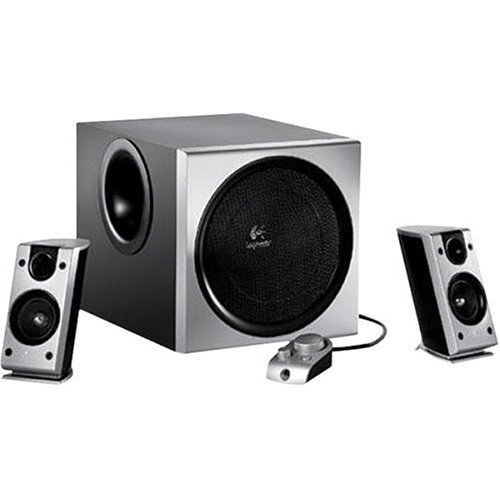
After hours of research, i have closed on Logitech Z2300, M-Audio Studiophile 30 and Bose companion 2. Though i don't think Z2300 will make the cut with its competitors, i am going to decide that only after listening to one of them at a store. If one prefers bass over vocal performance, Z2300 is the choice. I am not much after rap, R&B or house as my Last.fm library would tell you and so, the 2.1 Z2300 need not be the one for me.

Z2300 is $85 and the others sell at $99/pair on Amazon and BestBuy and hence technically in my budget. All of them seem to have the audio reproduction characteristics that i am looking at and i am already a little biased towards M-Audio from what i have discovered about them so far.


M-Audio Studiophile 30


Best in the category for its low to mid range reproduction. Most people who bought this felt that this pair produces the complete spectrum accurately.


Logitech Z2300


8" woofer for the beats


Bose Companion2


Famous for its stereo imagining capability


In part 2 of this blog, i'll update my in store experience with these speakers and my decision.

Sunday, January 11, 2009

Cisco VPN client setup on Sabayon linux 3.5

I have a Cisco VPN at work and CIsco provided VPN client won't install on my 64 bit windows Vista. Hence, i set it up on my Sabayon 3.5 mini linux box using 'vpnc' and 'rdesktop'. This is how you do it.

Install vpnc. 'vpnc' is the application that sets up a network connection with the VPN server by adding a rounter configuration.

Find the latest version of vpnc available to you by running


equo search vpnc


Install it


equo install net-misc/vpnc-0.5.2_pre20080509-r1


Next step is to create a vpnc configuration. If you have a 'pcf' file, you can do this by running the 'pcf2vpnc' utility. PCF is the CISCO client configuration file. Ask your network admin to procide you one. I am writing the configuration to vpnc's default configuration file so that i don't have to specify a configuration file when starting vpnc.


pcf2vpnc <pcf file> /etc/vpnc/default.config


Double check the configuration is intact. Also, if you are manually setting up configuration and not creating it from a pcf file, this is where you do it.


nano /etc/vpnc/default.config


## generated by pcf2vpnc
IPSec ID <connection_name>
IPSec gateway <vpn_ip>
IPSec secret <vpn_pwd>

Xauth username <domain name\username of the network you are connecting to> # domain\userId
Xauth password <domain password> #pwd
IKE Authmode <authmode> # Leave this to default


Start vpnc.


localhost pjames # vpnc
VPNC started in background (pid: 8138)...


If you get this message, we are good. vpnc deamon has started successfully.

Verify the connectivity. Check 'netstat -r' and make sure you see the new network connection to VPN server. Then, ping a machine in your VPN network.

So far, we have established a connection to the VPN. However, for a connection to the terminal desktop, you need a GUI tool - 'rdesktop'.

Install rdesktop.


equo install rdesktop


Now run rdesktop from console.


rdesktop -d <domain> -u <user> -p <pwd> <machine name>


You should get the target machine's desktop now. Disconnect from the machine and run rdesktop with '-f' flag for full screen.


rdesktop -f -d <domain> -u <user> -p <pwd> <machine name>


Now, let us add 'vpnc' as a start up service so that you don't have to do it manually every time.

rc-update add vpnc default


Last thing you may want to do is to create launcher for 'rdesktop' and place it as a short cut.

Thats it. I am one click away from my office machine now.


Update: The default conf file name for vpnc should be vpnc.conf (not default.conf) for the deamon to load it while start up.

Saturday, January 3, 2009

TV++, watch it anywhere

Continuing from my previous blog, this is the last blog of this series that will talk about options that will get your favorite programs and media files for view anywhere. You don't really need that TV set in your home to watch the last episode of "The Family Guy". You can watch it over the internet from anywhere - your office (you don't really wanna do that), coffee shop, airport lounges, etc., etc., any place with a wi-fi. All you need is to add this one more box to your home theater setup, called 'SlingBox'.

SlingBox can connect to a DVR or TiVo and broadcast your signals across the internet so that you can watch them on a laptop from any place. They also have a product called Sling Catcher which can grab signals from a SlingBox within the limited radius and let you watch TV on another television or laptop within the house.

On their website, they have shown the various uses of a SlingBox. watch it here.

So, If you recognize yourself as someone who is addicted to television, spends a lot of time in front of it; and often misses other things in life, this is the setup for you- LCD/Plasma TV, TiVo and a SlingBox. And maybe a good BlueRay player for those rentals.

What can be the next development in television broadcast? I am guessing it going to become even more mobile. Like, for eg., you can connect to your channels using a mobile phone. You need a media streaming client in your mobile phone that can connect to your home DVR/TiVo and get your personal media; or watch your channels on a mini TV in your car. Wait and watch!!

Thursday, January 1, 2009

GA, are they watching us?


You : GA**, are they watching us?
GA : Lemme check the radar
You : What does it say?
GA : As a matter of fact, they are..including three new from Russia, you have been in their views for the last 3 days, 200 of them, to be precise.
You : Emmm...do i have reasons to panic?
GA : I am sorry, i can't tell you that. I am only a website analytic robot.

{John Williams play 'Prologue' in the background}

=== End of chapter 3: the unknown element===
=== Curtains ===


GA**: Google Analytics is a website traffic analizer from google. It can tell you quite an interesting number of facts about your website, like

  • how many visitors have been on your site
  • how many of them are new visitors
  • which page attracts more users
  • what parts of the world your users are from
  • how much time do they spend on your site
  • traffic source to your site


You also have the option to set goals for your site and map it against the actual.

What you need first is a google user account and profile. Then go to google analytics and access analytics. Register your website address in your analytics profile. You are almost done.

Google needs to put a small javascript snippet in your website to send traffic information to analytics engine. This javascript code, which google will provide you once you register your website, needs to go between the <head> and </head> tags of your website HTML.

PS: If you want to track traffic on your blog site; you can do that buy going to your blogger account->Layout->Edit HTML. make sure to put this script in <head> section itself, though google will ask you to put it in <body> tag. <head> is the right place for javascript and everything will work properly. It only makes a difference if you have Ajax style body rendering without loading the entire page. Since that is not the case with blogger, we are good.

You are all set. Give google 24 hours to collect the initial stats from your site and be surprised to see who your users are.

For more details, go to analytics help


=== Curtains up ===
{John Williams play 'Duel of the fates'}
=== Chapter 4 : duel of the fates===

Monday, December 22, 2008

TV++, making it work for you

Okay, so now since we decided on a HDTV (Don't agree? read my previous blog and perhaps you will), let us see what are the options to make TV viewing exclusive.

Once you have a DTH service hooked up, next best hardware you should look for is TiVo. TiVo is basically a DVR (Digital Video Recorder) that you can program to record your favorite programs while you are away. However, this is not the only reason why i vote for TiVo. Most DTH providers have DVRs built into their receiver units these days. What makes TiVo a better unit out of all that is its next level of features.

TiVo can be programmed online to schedule a recording. This means, you can go online from anywhere on to their web site or use their mobile app, login to your account and schedule recording for your home setup.

If you are someone who likes to watch online videos and movies, TiVo brings good news for you. It can directly connect to many of those online video stores - YouTube, hulu, netflix, amazon unbox, etc. - and you get to watch your favorite online show on the big TV screen. Hulu is my favorite online TV channel.

Now, you want to play DVDs or downloaded movies from your PC/Mac? Don't look for that HDMI, S-video or RGB cable, use TiVo's network services (you need the wireless network adapter for this) to connect to your PC and play tracks on TV.

If you haven't realized what all this means, you are actually making TV work for you. You don't need to rush for a program or cancel another appointment for a TV program again. Get them on your DVR and watch it at your convenience.

This, BTW is not a new invention from TiVo. This is what Microsoft wanted to do when they introduced the media center edition. The only thing they forgot was to move it out of a PC and have a specific hardware to do that. So, if you have an old PC that you think you can spare for media setup, you may try that as well. Looking for open source options, try media center options (MythTV) from Linux/Ubuntu. They work just as great as Windows media center.

Coming next, the sling box.

Sunday, December 21, 2008

TV++, the displays

Thinking about your next TV? Here are the options for you from ground zero.

TV viewing has advanced to much higher levels in recent years. Gone are the days of antennas and CRT(Cathode Ray Tube) TVs. Enter HD(High Definition) TV and possibilities. I am trying to jot down my understanding of all the new technologies available that makes TV viewing much more convenient.

HDs are high definition TVs which can produce better resolution than CRTs. This means, the same picture that you used to see with 720X480 pixels per screen on an NTSC broadcast can be viewed with 1080X720(720p) pixels. This means more colors, better contrast and more depth to your picture. Even better, 1080p displays can scale up to 1920X1080 pixels.

Then there is the difference between interlace and progressive technologies. Interlacing is the display technology behind CRTs. This method splits the pixel lines on your screen into 2 groups of alternate lines and draws only alternate lines with every screen refresh or screen draw. This causes the screen flicker on CRT TVs. Due to the alternate line refresh technique, the net resolution you get out of a CRT is only 85% (Kell factor) of the original screen resolution.

Progressive scans can give 95% net screen resolution as compared to 85% for CRTs. This is because progressive draws all the pixel lines on screen sequentially one by one. This obviously means higher signal bandwidth TV signal to display a screen; but at the benefit of flicker free screens. With our communication systems so good these days, channel providers are getting on to higher and higher bandwidth telecasts and today's broadcasts even include scheduling data along side your actual TV transmission.


In my next blog, i will jot down the latest on technologies that can make TV viewing so much personalized.